The Best Desk Setup for Hip Flexor Tightness: What Actually Helps After Sitting
The best desk setup does two jobs: it reduces strain while you work and supports the off-desk reset your hips still need after sitting. Monitor height, chair position, keyboard height, movement breaks, and lumbar support all matter — but they do not apply pressure to the psoas and iliacus. That is the gap Core Nexus fills: a dual-tip self-release tool built so desk workers can work on both hip-flexor muscles at home, consistently, without buying another chair or guessing with a generic massage tool.
In This Article
- The 5 Setup Changes That Actually Matter
- Where Core Nexus Fits in a Desk Setup
- What Doesn’t Matter as Much as You Think
- What Every Ergonomic Guide Misses: The Hip Flexors
- 3 Desk Stretches You Should Actually Do
- The Complete Desk Worker Reset
- How Desk-Day Reset Methods Compare
- The Bottom Line
- Frequently Asked Questions
The Core Nexus features muscle-specific tips, a self-rotating design, and 3D-printed TPU construction — virtually unbreakable.
You’ve probably read a dozen articles about ergonomic desk setups. They all say the same things: raise your monitor, adjust your chair, use lumbar support, and consider a standing desk.
That advice is useful. It is also incomplete.
Here’s the cleaner way to think about it: the best desk setup reduces the load your body has to manage, but it does not erase the position your hips spend hours in. Sitting keeps the hip flexor complex shortened. Over time, that can leave the front of the hips guarded, the pelvis pulled forward, and the lower back feeling stiff when you stand up.
This guide separates the desk changes that actually help from the upgrades that get oversold — then shows where Core Nexus fits: not as another desk accessory, but as the targeted reset tool for the muscles the desk setup cannot reach.
The 5 Setup Changes That Actually Matter
1. Monitor at Eye Level (Non-Negotiable)
If the monitor sits below eye level — which happens whenever a laptop is used without a stand — the neck and upper back drift forward for every hour of work. That posture does not stay isolated at the neck. It changes how the shoulders, ribs, pelvis, and lower back share the workload.
The setup: Keep the top of the screen at or slightly below eye level. For laptops, use an external monitor or a laptop stand with a separate keyboard. This is usually the fastest way to reduce the rounded desk posture that builds up through the day.
2. Feet Flat, Thighs Parallel (Important)
When the feet dangle or the thighs slope downward, the pelvis has to compensate. When the seat is too low, hip flexion increases and the psoas and iliacus spend even more time in a shortened position than a neutral seated posture already creates.
The setup: Adjust chair height so the thighs are roughly parallel to the floor and both feet are supported. If the feet do not reach the floor comfortably, use a footrest. If the desk is too low for your height, consider a riser or adjustable-height surface.
3. Keyboard Position (Underrated)
If the keyboard sits too high and the arms have to reach upward, the shoulders shrug. That can feed neck and upper-back tension, and it changes the posture of the entire trunk over a long desk day.
The setup: Keep elbows near 90 degrees or slightly open, forearms close to parallel with the floor, and wrists neutral. If the desk surface is too high, a keyboard tray can pull the typing surface to the right height without replacing the desk.
4. Standing Desk — But Not How You Think
Standing all day is not automatically better than sitting all day. It is still a static position. The value of a standing desk is not standing; it is transitioning.
The setup: Use the 20-8-2 rule — every 30 minutes, cycle between 20 minutes sitting, 8 minutes standing, and 2 minutes moving. Walking, stretching, or any position change counts.
5. Lumbar Support — With a Caveat
A lumbar support cushion or chair with built-in lumbar adjustment can help maintain a better seated curve. It is genuinely useful — but it is not the whole answer.
Lumbar support helps the spine hold a better position. It does not change what is happening at the front of the hips. If the psoas and iliacus stay guarded from long seated blocks, the pelvis can still feel pulled forward when you stand, even if the chair itself is well adjusted.
content-library/organized/product-photos/carmel-shoot/IMG_4702.jpg → uploaded as article-pp05-product.webp
The Core Nexus is engineered with muscle-specific tips to reach both the psoas and iliacus — the two muscles most affected by prolonged sitting.
Where Core Nexus Fits in a Desk Setup
If a chair, monitor riser, or standing desk were the full answer, desk workers with expensive setups would stop feeling locked up after long work blocks. But ergonomic equipment only changes the environment around the body. Core Nexus is for the part the environment cannot do: direct pressure into the hip-flexor muscles that stay shortened while you sit.
Core Nexus is a compact, under-1-lb self-release tool designed around one idea: the psoas and iliacus are not the same muscle, so they should not be approached with the same shape. The broader tip is built for psoas pressure. The narrower angled tip is built to work along the inside of the hip bone where the iliacus sits. The tool self-rotates so the angle can settle as your body position changes instead of forcing one fixed contact point.
That matters for desk workers because the common alternatives all leave a gap. A chair supports posture but never reaches the hip flexors. Stretching changes position but does not add sustained pressure. Foam rolling is too broad for the front of the hip. Massage therapy can reach both areas, but it depends on appointments and repeat cost. Core Nexus gives desk workers a repeatable at-home option for the muscles most affected by sitting.
It is also not only a “front of hip” tool. The same one-piece TPU body can be used on glutes, piriformis, TFL, and glute medius for the back and side of the hip. That is why the value is not just “psoas pressure.” It is a more complete hip reset: psoas, iliacus, and the surrounding hip muscles that desk sitting tends to load together.
What Doesn’t Matter as Much as You Think
Expensive Ergonomic Chairs ($1,000+)
A moderately priced chair with the right adjustments can outperform a premium chair that is set up poorly. The chair matters, but the setup matters more. And no chair — at any price — changes the basic fact that sitting keeps the psoas and iliacus shortened.
Posture Correctors
Wearable devices that vibrate when posture slips can build awareness, but that awareness fades when the device comes off. Posture is not just a discipline issue. If the hips are stiff and the pelvis is being pulled forward, “sit straight” takes constant effort through the entire workday.
Balance Ball Chairs
Balance balls sound useful because they require more stabilizing work. In practice, many people fatigue quickly, then slump without back support. They can be useful for short movement breaks, but they are not a strong full-day seating solution.
What Every Ergonomic Guide Misses: The Hip Flexors
Here’s what most desk setup guides leave out: the most important reset for a long desk day may not happen at the desk. It happens when you work on the muscles that stay shortened while you sit.
The psoas and iliacus — the primary hip flexors — are shortened every time the hips are flexed in a chair. No chair, lumbar cushion, or standing desk changes that basic position. Good ergonomics reduces unnecessary load; hip-flexor work addresses the muscles that adapt to the seated position itself.
This is why the complete desk-worker approach needs both sides of the equation: setup plus reset. Ergonomics reduces strain while you work. Direct, sustained pressure and controlled mobility work help the psoas and iliacus move out of the shortened desk-day pattern.
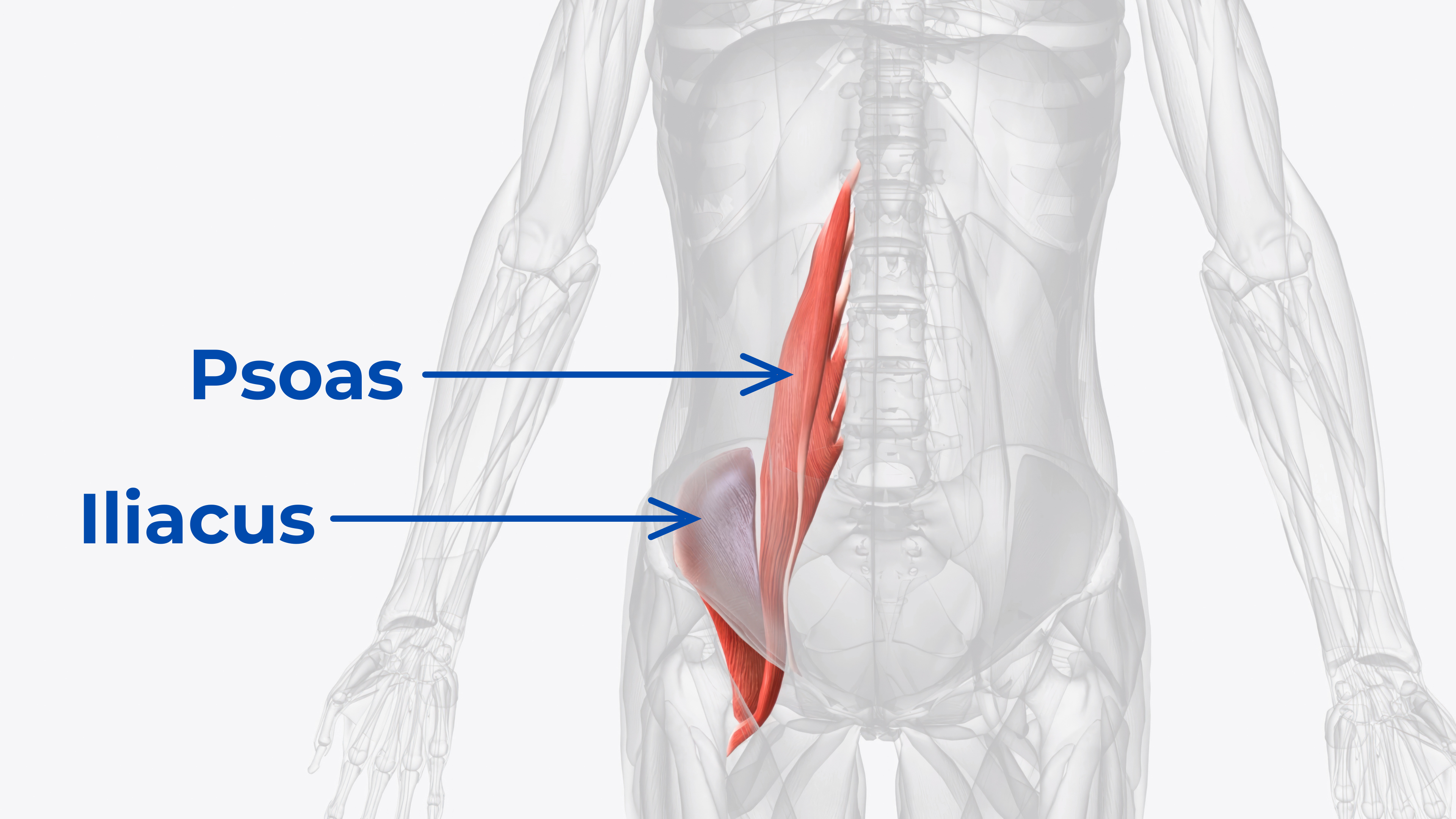
CDN shared asset — anatomy-psoas-iliacus.png
The psoas (spine to femur) and iliacus (hip bone to femur) function together but require different release angles. Most tools only reach one.
3 Desk Stretches You Should Actually Do
1. The Standing Psoas Stretch
Stand and step one foot back into a long lunge. Tuck the pelvis slightly and gently press the hips forward. The stretch should be felt at the front of the hip on the back leg, not mostly in the low back. If the low back takes over, reduce the range and tuck the pelvis more.
2. The Seated Figure-4
Cross one ankle over the opposite knee. Sit tall and gently lean forward from the hips. This targets the deep hip rotators and glute muscles, which often tighten alongside the hip flexors during long seated blocks.
3. The Thoracic Extension
Interlace fingers behind the head. Keeping the lower back supported against the chair, extend the upper back over the top of the chair’s backrest and breathe. This counterbalances the forward-rounded desk posture that builds up through the upper back and chest.
The Complete Desk Worker Reset
For anyone sitting more than four hours a day, the strongest approach is a simple stack:
During the Workday
- 20-8-2 rule — sit/stand/move cycling every 30 minutes
- Desk stretches during breaks, especially the three above
- Short walks every 90 minutes when possible
Off-Desk Reset
- Psoas release: slow, sustained pressure on the psoas side of the hip flexor complex
- Iliacus release: slow, sustained pressure along the inside of the hip bone, where a different angle is needed
- Follow with a hip flexor stretch so the new range has a movement pattern behind it
Where Core Nexus Does the Heavy Lifting
In this stack, Core Nexus is the self-release tool. The ergonomic setup reduces unnecessary strain. The movement breaks keep the body from staying fixed. Core Nexus is the piece that lets you apply slow pressure to the psoas and iliacus themselves.
- Two muscle-specific tips: a broader psoas side and a narrower angled iliacus side, instead of one generic contact shape
- Self-rotating pressure: the tool can settle into the angle your body needs instead of forcing a fixed position
- Single-piece professional-grade TPU: durable enough for repeated home use without a multi-piece assembly
- One tool for more than the hip flexors: use it for glutes, piriformis, TFL, and glute medius when the whole hip feels loaded from sitting
- Built for consistency: small enough to keep near the desk, simple enough to use as part of a regular mobility routine
Ongoing
- Glute activation such as bridges or clamshells to support the back of the hip
- Core stability work such as dead bugs or bird dogs to support the trunk while the hips regain mobility
How Desk-Day Reset Methods Compare
Before the table, define the product: Core Nexus is the dual-tip Nexus Health Tools release tool for the psoas and iliacus. It is not a chair, cushion, or stretch. It is the self-release option in the desk-worker stack — the tool you add when the ergonomic basics are handled but the hip-flexor reset is still missing.
| Method | Reaches Psoas? | Reaches Iliacus? | Sustained Pressure? | Daily Use? |
|---|---|---|---|---|
|
Core Nexus Dual-tip psoas + iliacus release tool |
✔︎ | ✔︎ | ✔︎ | ✔︎ |
| Ergonomic Chair | ✘︎ | ✘︎ | ✘︎ | ✔︎ |
| Lumbar Support | ✘︎ | ✘︎ | ✘︎ | ✔︎ |
| Standing Desk | ✘︎ | ✘︎ | ✘︎ | ✔︎ |
| Stretching | ~ | ✘︎ | ✘︎ | ✔︎ |
| Foam Rolling | ✘︎ | ✘︎ | ✘︎ | ✔︎ |
| Massage Therapy | ✔︎ | ✔︎ | ✔︎ | ✘︎ ($$$) |
The Bottom Line
The five ergonomic changes in this guide are worth doing. Monitor height, seat position, keyboard angle, movement cycling, and lumbar support all reduce the strain of a long desk day.
But if the article stops there, it leaves out the buying decision that matters most for many desk workers: no desk accessory applies targeted pressure to the psoas and iliacus. A chair can support the spine. A standing desk can help you change position. A cushion can improve the curve of your lower back. None of them work on the two hip-flexor muscles that stay shortened while you sit.
That is why Core Nexus belongs in the desk-worker setup. It gives you one tool with two different contact shapes: one for the psoas, one for the iliacus. Instead of choosing between a generic roller, a stretch routine, or another expensive chair upgrade, you get a targeted way to work on both areas at home.
The practical benefit is simple: after the workday, you can reset the exact area that spent hours in flexion. The broader psoas tip, narrower angled iliacus tip, and self-rotating design make Core Nexus different from tools that only press one area or require you to contort around a fixed shape.
For desk workers, the complete stack is not “buy a better chair and hope.” It is set up the workstation well, move throughout the day, then use Core Nexus to work on the muscles the desk setup cannot reach.
Ready to add the missing reset to your desk setup?
Endorsed by Clinicians
Dr. Goñi
MD — Sports Medicine
Dr. Sosa
DC — Chiropractic
Dr. Lang
PT, DPT — Physical Therapy
Dr. McHale
DC — Chiropractic
Dr. Steph Dorworth
PT, DPT — Physical Therapy
Frequently Asked Questions
Monitor height is usually the highest-impact first adjustment because it changes the posture of the entire spine. Set the top of the screen at or just below eye level. For laptop users, that usually means a stand plus an external keyboard so the neck, shoulders, and lower back are not pulled into the same forward-rounded position all day.
Not by itself. Standing all day creates a different static position. The benefit of a standing desk is position cycling: sit, stand, then move. Use the 20-8-2 pattern as a simple reset: 20 minutes sitting, 8 minutes standing, and 2 minutes moving.
A chair can support spinal position, but it does not change what happens at the front of the hips while sitting. The psoas and iliacus stay shortened during long seated blocks. That is why desk setup and targeted self-release work are different categories: one supports posture, the other works on the muscles affected by the seated position.
The psoas and iliacus are the primary hip flexor muscles. Sitting keeps the hips in flexion, which means those muscles spend long periods in a shortened position. Over time, the body can adapt to that position, making the front of the hips feel guarded or locked up.
Core Nexus is a dual-tip self-release tool for the psoas and iliacus. It fits into a desk setup as the off-desk reset: the chair, monitor, and keyboard reduce strain while you work, while Core Nexus lets you apply targeted pressure to the hip-flexor muscles that stay shortened while sitting.
Yes, as one layer of the setup. Lumbar support can help maintain a better seated curve and reduce the tendency to collapse into the chair. It should be paired with movement breaks and hip-flexor release work rather than used as the entire solution.
Shop NHT Direct